
Views: 78 Author: Site Editor Publish Time: 2025-12-26 Origin: Site


Guided Wave Radar (GWR) Level Transmitters are widely recognized for their accuracy, reliability, and ability to operate in challenging environments. Despite their robust design, issues can occasionally arise that affect performance, such as incorrect readings, signal loss, or environmental interference. Troubleshooting these problems quickly and effectively is crucial to maintaining optimal performance and avoiding costly downtime. This article aims to guide users through some of the most common issues encountered with GWR transmitters, offering practical solutions and maintenance tips to keep your system running smoothly. By understanding these common issues and knowing how to address them, industries can maximize the benefits of GWR technology in their level measurement applications.
Possible Causes:
Improper calibration: If the transmitter is not properly calibrated, it may give inaccurate level measurements.
Changes in material properties: Variations in the material's properties, such as density or dielectric constant, can affect readings.
Build-up on the probe: Accumulation of material on the probe can cause signal interference and lead to incorrect measurements.
Solution:
Recalibration: Ensure the transmitter is correctly calibrated for the specific application.
Cleaning the probe: Regularly clean the probe to remove any build-up that could interfere with the signal.
Adjusting for media changes: Reconfigure the transmitter settings to account for any changes in the material’s properties.
Possible Causes:
Excessive foam or turbulence: Foam on the liquid surface or turbulence in the media can scatter radar signals and cause weak or lost signals.
Media with low reflectivity: Materials with low reflectivity, like some slurries or dry powders, may not reflect radar signals well, resulting in weak signals.
Solution:
Adjusting settings: Modify the transmitter's settings to better suit the media, such as increasing the gain or adjusting the signal processing.
Installing a more suitable probe: Choose a probe designed to handle difficult media, such as those with a more focused or specialized radar beam.
Possible Causes:
Electrical noise: Interference from nearby electrical equipment can distort the signal.
Temperature fluctuations: Sudden or extreme temperature changes can impact the performance of the radar system.
Vibrations: Mechanical vibrations from nearby equipment can disrupt the sensor’s ability to detect accurate readings.
Solution:
Proper grounding: Ensure the transmitter and surrounding equipment are properly grounded to prevent electrical interference.
Shielding: Use shields to protect the transmitter from external electrical or magnetic interference.
Stable installation environment: Install the system in a location with minimal vibration and temperature fluctuations.
Possible Causes:
Probe contamination: Contaminants on the probe can affect signal transmission and cause inaccurate readings.
Wear and tear: Over time, the probe can degrade, leading to reduced measurement accuracy.
Environmental factors: Changes in environmental conditions, such as humidity or pressure, may cause measurement drift.
Solution:
Regular maintenance: Schedule routine checks and maintenance to identify issues before they affect performance.
Probe cleaning: Regularly clean the probe to remove contaminants and prevent build-up.
Environmental assessment: Monitor and adjust for any changes in environmental conditions that could affect measurements.
How Probe Contamination or Build-up Can Affect Signal Transmission:
Contaminants such as dirt, material buildup, or deposits on the probe can interfere with radar signal transmission, leading to inaccurate level readings or signal loss. Over time, buildup can cause signal reflection issues and even completely block the radar waves.
Cleaning Techniques and Recommendations:
For Liquid Media: Use a non-abrasive cloth or brush and a mild cleaning solution to wipe the probe clean. For stubborn residues, use appropriate solvents compatible with the material.
For Solid Media: Consider using a scraper or soft brush to remove solid deposits. If the material is sticky or high-viscosity, more frequent cleaning may be necessary.
For Corrosive or Harsh Materials: Always refer to the manufacturer's guidelines for safe cleaning materials, ensuring that solvents do not damage the probe material.
Importance of Recalibrating GWR Transmitters Regularly:
Calibration ensures that the transmitter provides accurate level readings. Over time, changes in the environment or media can affect the transmitter's performance, so recalibration is crucial to maintaining precision.
Steps to Recalibrate and Adjust for Media or Installation Changes:
Access Calibration Settings: Use the transmitter’s display or software interface to access the calibration settings.
Perform a Zero-Calibration: Reset the system to measure the zero level (empty or reference condition).
Adjust for Media Changes: If there have been changes in the material properties (e.g., density, viscosity), adjust the settings accordingly.
Test Calibration: After adjusting, verify the readings with known reference levels to ensure accuracy.
Ensuring the Installation Site is Free from Excess Vibrations, Electrical Interference, and Temperature Extremes:
Environmental factors such as vibrations, electrical interference, and extreme temperatures can distort the radar signal and affect the transmitter’s performance.
Recommendations for Optimal Installation Locations:
Minimize Vibration: Install the transmitter away from heavy machinery or equipment that generates excessive vibration.
Reduce Electrical Interference: Ensure proper grounding and shielding of cables and wiring to protect against electrical noise.
Control Temperature Extremes: Install the transmitter in an area with stable temperature conditions, avoiding direct exposure to heat sources or extreme cold.
Checking the Transmitter Settings to Ensure They Are Appropriate for the Specific Application and Media Type:
Incorrect settings or mismatched configurations can cause inaccurate measurements or signal interference, especially when switching between different materials or environmental conditions.
Steps to Review and Adjust Configuration:
Check Media Type Settings: Ensure the transmitter is configured for the correct material type (liquid, solid, slurry) and the corresponding dielectric constant.
Review Range Settings: Adjust the measurement range to ensure it covers the required levels without overreaching or underestimating.
Verify Signal Processing Settings: If using a signal filter or gain adjustments, ensure these are set to optimize signal quality for the specific media and conditions.
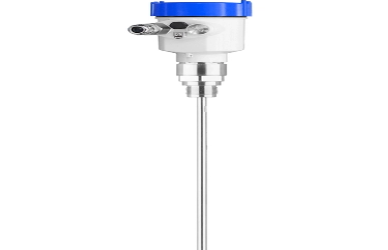
To ensure Guided Wave Radar (GWR) transmitters operate reliably, establish a regular maintenance schedule:
Inspections: Check for probe contamination, wear, or damage, ensuring proper functionality.
Probe cleaning: Clean regularly to prevent build-up that could interfere with signals.
Calibration: Perform periodic recalibration to maintain measurement accuracy, especially after environmental or process changes.
Environmental factors can affect GWR performance. To prevent issues:
Monitor temperature and humidity: Keep the installation environment within recommended conditions to avoid performance issues.
Minimize vibrations and interference: Ensure proper shielding from vibrations and electrical noise to avoid signal disruption.
Adjust for media changes: Adapt the settings if the material being measured changes over time (e.g., in density or viscosity).
Proper installation: Ensure the transmitter is securely installed away from interference and extreme conditions.
Use quality components: Choose durable cables and connectors to minimize external failures.
Regular monitoring: Track system performance with real-time data analysis to identify potential issues early.
Watch for changes: Regularly check for shifts in environmental or material conditions and adjust settings to optimize performance.
Inaccurate readings may be due to incorrect calibration or probe contamination.
Steps:
Recalibrate the transmitter for accuracy.
Clean the probe to remove build-up or contamination.
Check for obstructions or environmental factors affecting performance.
Foam and turbulence can scatter radar signals and weaken them.
Solutions:
Adjust settings to optimize for foam or turbulence, such as increasing gain or adjusting filters.
Use a suitable probe designed for foamy or turbulent media.
Install the sensor away from areas with excessive foam or turbulence.
Yes, temperature changes, vibrations, and electrical noise can interfere with radar signals.
Mitigation:
Ground and shield the transmitter to avoid electrical interference.
Install in a stable location to reduce vibrations.
Monitor temperature to keep the transmitter within operating limits.
The probe may need replacing if there’s wear or contamination.
Signs:
Cleaning fails to restore accuracy.
Physical damage or wear on the probe.
Persistent inaccuracies after cleaning and recalibration.
In summary, common issues with Guided Wave Radar (GWR) transmitters, such as inaccurate readings, signal loss, environmental interference, and probe wear, can usually be addressed through proper calibration, regular probe cleaning, and adjusting settings to account for specific operational conditions. These steps, along with a proactive approach to troubleshooting, are essential in maintaining the system’s accuracy and reliability. Regular maintenance—including inspections, recalibration, and monitoring environmental factors—helps prevent minor issues from escalating into costly downtime. It is also crucial to follow manufacturer guidelines for installation, operation, and maintenance to ensure optimal performance. If problems persist despite these efforts, seeking professional support can ensure timely resolution and prolong the lifespan of your GWR system, making it a reliable solution for continuous, accurate level measurement in demanding environments.


